Do DAW Project Files Prove You Made a Song?
A DAW project file can corroborate that someone had a particular editable session, arrangement, MIDI, settings and possibly related media. It does not conclusively establish who authored the music, who owns it, whether every referenced asset was theirs, or how a dispute will end.
Before you share a beat, demo or work-in-progress, preserve the whole working set and make a dated record for the exact archive or export you chose. That is more useful than relying on one project file or a saved-file date.
What each record can corroborate
| Record | Can corroborate | Does not establish on its own |
|---|---|---|
| Native DAW session | An editable arrangement, tracks, MIDI and settings references | Authorship, ownership or an independent trusted date |
| Project folder or archive | The session plus the related assets that were actually included | That external samples, plug-ins or their licences are included |
| Stems and final export | The separated parts and the exact release candidate | Who made every contribution or agreed the rights split |
| Messages and agreed records | Collaboration context and contemporaneous communication | A substitute for a complete agreement |
| Qualified timestamped hash and certificate | That the declared file or hash existed at the recorded time, and the integrity of the bound data | Authorship, ownership, infringement or a dispute outcome |
A project file is not always the whole project
Ableton explains that a Project folder includes a Live Set and related media, and recommends collecting files when preparing a project. FL Studio distinguishes an .flp project from a zipped project and warns that some referenced assets may not be included. Keep the session, its project archive, relevant stems and the export you intend to share, rather than treating one native file as the complete record.
Ableton: Saving Projects · FL Studio: Project File
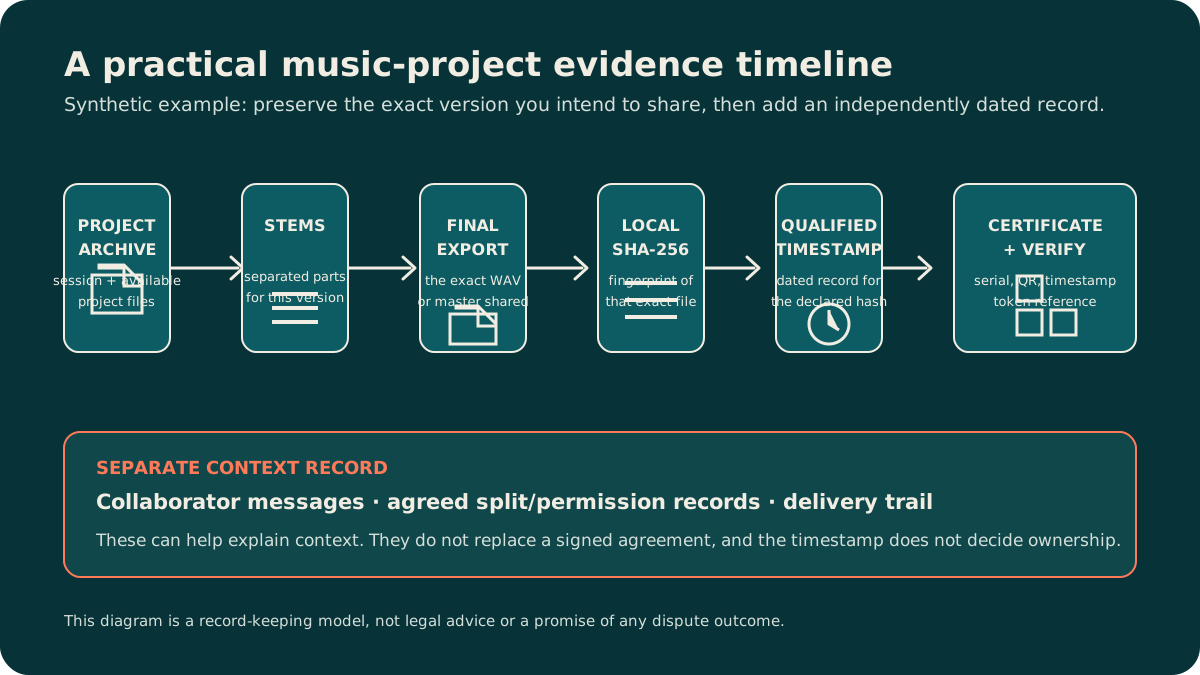
A practical before-sharing workflow
- Choose the exact version you need to preserve. Name it clearly and avoid changing the archive after making the record.
- Collect the project folder or archive, relevant stems and the intended final export. Note missing third-party samples or plug-in assets rather than implying they are present.
- Keep collaboration context separately: messages, delivery records and the agreements or permissions that actually govern contributors.
- Create a dated record for the selected archive or export. If the work changes, preserve the new version separately.
Where StampR fits
After selecting the exact archive or export, StampR computes a SHA-256 hash locally in the browser by default and binds the declaration and hash to a qualified timestamp. Your file is only stored if you choose the public-display option; leave it unticked and StampR keeps the hash and the declaration, not the recording — which is usually what you want for an unreleased demo. A certificate is a record for the selected data, not a music-rights registration, sample clearance, split sheet or guarantee about a dispute.
The technical timestamp format is described in RFC 3161. The EU framework for qualified electronic timestamps is set out in eIDAS Regulation (EU) No 910/2014. These sources do not turn a creative-session file into a conclusion about ownership.
Keep the next step matched to the question
If a beat has already been used without permission, read Someone Stole My Beat. If you are preparing to share it, read Sending a Demo to a Label. For the timestamp mechanism itself, see What is qualified timestamping?. The music creator hub maps the broader before-sharing workflow.
Certify your work with a trusted date.
Create a certificate →Your first certificate is €4.90 with an account.